Platform overview | Functn Help Center
Category: Getting started
Tour the Functn dashboard, sidebar, and major modules so you know exactly where every feature lives.
# Platform overview ## What this covers This article maps the current Functn help and dashboard navigation to the product that is implemented today. ## Where to find it Open /help for the Help Center. After signing in as an organizer, open /admin/dashboard for the organizer dashboard shell. The dashboard sidebar currently contains: | Section | What lives here | |---|---| | Home | Entry point for daily dashboard work. | | Dashboard | Organizer dashboard overview. | | Events | Event list and event-management entry points. | | Box Office | Check-In, Refunds, and Disputes. | | Orders | Customers, Membership, Add-Ons, and Checkout Fields. | | Marketing | Email Campaigns, SMS Campaigns, Social Media Campaigns, Promoter Network, and Ad Campaigns where available. | | Reports | Analytics, Revenue, Attendees, Marketing, Promoters, and Ads reports. | 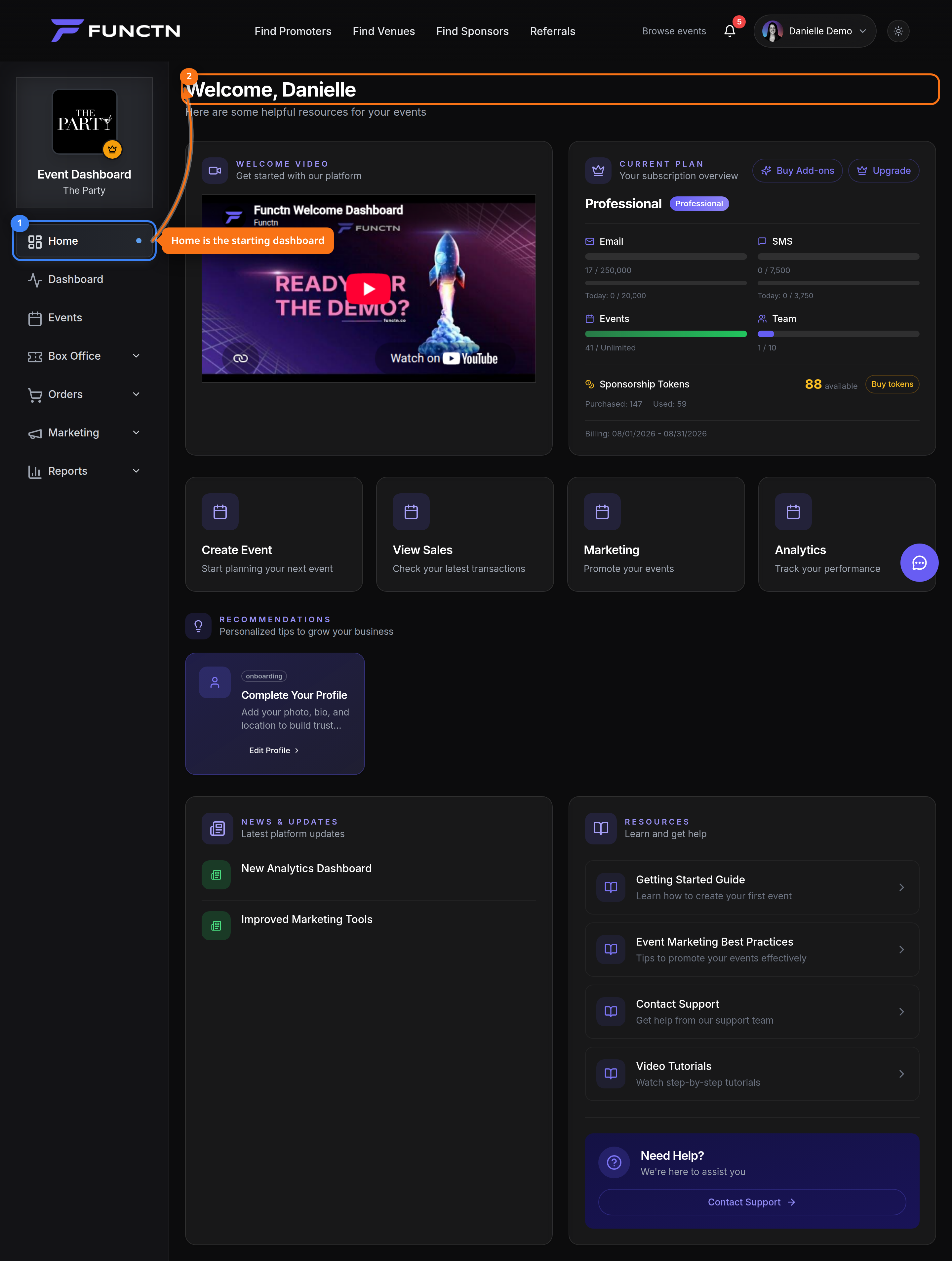 ## How it works The header links to resources such as the Help Center. User and team switching live in the profile dropdown; accounts with multiple teams or pending invitations see a Switch Team section there. The Help Center has its own command palette sh...